
Cookie Cutters
Shortcuts Software Pty LtdBeauty
4.045.00 Reviews
- Version
- 8.0
- Installs
- 100.00K
- Age Rating
- Everyone
Screenshots



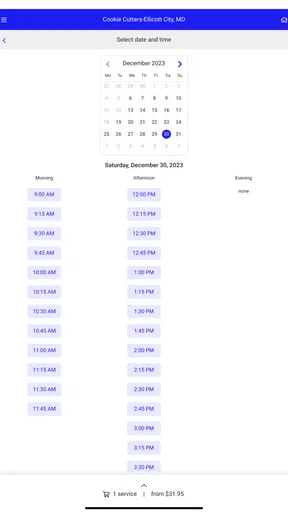
Our Review of Cookie Cutters
 Analysis by Appyee
Taking a child for a haircut can be a surprisingly difficult little event. The waiting, the unfamiliar chair, the buzzing tools, and the need to stay still can all feel much bigger to a young child than they look to an adult. Cookie Cutters approaches that problem as a beauty app for children, turning the idea of a haircut into something playful that can be explored on a phone or tablet before the real appointment. I found it most useful as a preparation and distraction tool rather than as a replacement for a salon visit.
Cookie Cutters is free, aimed at Everyone, and comes from Shortcuts Software Pty Ltd. It has been available since October 18, 2017, and the current version is 8.0, with support for devices running Android 5.1 or later. Its average rating is 4.0 from roughly 125 ratings, while the app has passed 100K installs. Those figures suggest a modest but established audience, and they match my impression: this is a focused, uncomplicated app designed around one very specific family situation.
What to consider before choosing it
I’d use this section to think through the child’s needs before installing: whether they enjoy pretend play, whether the haircut itself is worrying them, and whether a phone usually helps them settle. I’d also decide in advance what success looks like—perhaps a calmer conversation or a more relaxed wait—so the app is judged by its practical role, not by how long it holds attention.
It is a preparation tool, not a haircut simulator
The first question is what you actually need. If your child is nervous about visiting a barber or salon, a cheerful haircut-themed app can give you a way to introduce the subject without making the conversation feel like a warning. You can open it at home, let your child handle the device, and talk about what might happen in a relaxed setting.
That makes it different from a general beauty editor. An adult-oriented hairstyle app usually focuses on appearance, experimentation, or photo editing. Cookie Cutters is more relevant when the user is a child and the goal is comfort, familiarity, and fun. I would not choose it to plan a precise haircut for a stylist, compare professional looks, or judge whether a particular cut suits a face. Its value is emotional and practical rather than technical.
The child’s age and temperament matter
The Everyone rating makes it suitable for a broad family audience, but that does not mean every child will respond to it in the same way. A preschooler who enjoys pretend play may engage immediately, while an older child may find the theme too young. A child who dislikes screens could also get more from a real conversation, a picture book, or a short visit to the salon before the appointment.
I would use the app as an invitation rather than a demand. Instead of saying, “You need to play this because you are getting a haircut,” I would let the child explore it when they are calm. That small change matters. The purpose is to make the subject ordinary and approachable, not to turn the phone into another source of pressure.
Free changes the decision, but not the expectations
Because it is free, Cookie Cutters is easy to try before deciding whether it belongs in your family’s routine. There is no purchase decision to justify for a single appointment, which is important when you are looking for a quick solution to a short-term problem. I see the free availability as one of its strongest practical advantages.
At the same time, free does not automatically mean it will suit your child. The right test is simple: does your child willingly return to the haircut theme, and does the app help you talk about the upcoming visit? If the answer is no, there is little reason to keep using it just because it costs nothing. A short trial at home will tell you more than the download itself.
A realistic family scenario
Imagine a child who has an appointment after preschool and has already started saying they do not want to go. I would open Cookie Cutters earlier in the day, when there is no rush, and sit beside them for a few minutes. We could talk about hair, choose a playful idea, and then move on to lunch or another activity. Later, I could refer back to the experience: the salon is a place where people work with hair, not a mysterious event that suddenly appears at the end of the day.
On the way to the appointment, the app could serve as a familiar distraction during waiting time. I would keep the session short, however. A child who is already restless may become more frustrated if the device is taken away abruptly, so I would explain the plan in advance: a little screen time while waiting, followed by putting it away when the stylist is ready.
How Cookie Cutters performs in everyday use
In everyday use, I’d focus on timing and transitions: try it at home before the appointment, then agree on when the device will be put away. That gives the child a familiar activity without making the phone the whole plan. I’d also consider whether the salon visit calls for playful reassurance or a more direct conversation with the stylist about the child’s particular concerns.
Where it wins over broader alternatives
The biggest strength is its narrow focus. Instead of asking parents to adapt a general game or a grown-up beauty tool, it gives them a child-centered way to approach haircuts. That makes the app easier to explain. You do not need to invent a complicated activity around it; the connection between the app and the upcoming appointment is already clear.
It also works well as a shared activity. I would not hand it to a child and expect it to solve anxiety on its own. Sitting with the child lets me answer questions, notice what makes them uncomfortable, and connect the playful experience with real details such as sitting still, wearing a cape, or hearing unfamiliar sounds. The app becomes a conversation starter, which is more useful than passive screen time.
Another advantage is that it can help a child feel involved. Haircuts often involve adults making all the decisions, while the child is expected to cooperate. Giving the child a playful role in the process can make the appointment feel less imposed. Even when the app does not settle on a real hairstyle, the act of exploring the topic may give the child a sense of participation.
Three practical ways to get more from it
First, use it before the child is upset. Parents often reach for a distraction only once a child is already crying or refusing to sit down. In my experience, that is too late for most preparation tools. A calm session at home creates familiarity, while a rushed session outside the salon is mainly useful for passing time.
Second, connect the app to a simple real-world sequence. I would describe the visit in small steps: arrive, wait, sit in the chair, let the stylist work, and leave. The app can make the subject fun, but the child still benefits from knowing what the actual appointment may involve. This is a non-obvious distinction: playful preparation works best when it is paired with honest expectations rather than used to promise that everything will feel exactly like the screen.
Third, let the child stop. If the app brings up resistance, forcing continued play defeats the purpose. You can try again another day, or switch to a different preparation method. The useful signal is not how long the child uses it; it is whether the child becomes more willing to talk about haircuts without becoming distressed.
Where it may feel limited
The same focus that makes Cookie Cutters approachable also limits its lifespan. Once a child is comfortable with haircuts, the app may no longer offer much value. It is not something I would expect to become a daily favorite for every child, especially if they want fast action, stories, or a broader range of play.
It is also not the right answer for a child who needs detailed preparation for sensory reasons. A playful haircut theme cannot replace a careful conversation with the salon about noise, touch, timing, or accommodations. If your child has had a particularly difficult experience, I would treat the app as one small support, not the main plan.
Parents should also remember that a device can distract without teaching cooperation. A child may be calm while holding the phone and upset as soon as it is removed. I would therefore use it alongside familiar routines, a comfort object where appropriate, and clear explanations. The app can occupy attention, but it cannot guarantee a smooth appointment.
How it compares with the usual alternatives
A children’s haircut app has a different job from a hairstyle editor, a general dress-up game, or a video. A hairstyle editor is better when the goal is visual planning or showing an adult what kind of look you have in mind. A general dress-up game may provide more variety and longer-term entertainment, but its connection to an actual haircut is weaker. A video can demonstrate what happens in a salon, although it gives the child less control and may move at a pace that does not suit them.
Cookie Cutters is the better fit when you want a simple, hands-on introduction to the idea of a haircut. I would choose a broader alternative if the child is older, wants more creative freedom, or needs entertainment unrelated to grooming. I would choose a real salon visit or a conversation with the stylist if the concern is highly specific and practical. The decision is less about which option is “best” overall and more about whether you need preparation, planning, or distraction.
The cost of switching to another approach
Since Cookie Cutters is free, switching away from it is easy in financial terms. The real cost is time and familiarity. If your child has begun to associate it with the haircut routine, replacing it immediately before an appointment could remove a small source of comfort. I would test any alternative on an ordinary day rather than introducing it for the first time in the waiting room.
Switching to a general game may also change the child’s expectations. They may focus on winning, collecting, or fast interaction instead of thinking about the haircut itself. Switching to a video may make the process clearer, but the child becomes a viewer rather than an active participant. Switching to a photo-based beauty tool may help an older child discuss style, but it could create expectations that a young child cannot easily communicate to a stylist.
For that reason, I would not replace Cookie Cutters simply because another app looks more polished or offers more content. I would replace it when the goal changes. If the appointment is no longer frightening but the child wants help choosing a cut, use a more suitable visual reference. If the child needs sensory preparation, prioritize a real plan with the salon. If the child only needs to wait quietly, almost any familiar activity may work.
Who should use it and who should skip it
I recommend giving Cookie Cutters a try if you are preparing a young child for a first haircut, returning after a difficult experience, or looking for a gentle way to make salon visits less intimidating. It is especially useful for parents who prefer to introduce a new situation through play rather than through a long explanation.
I would skip it if you are searching for professional hairstyle advice, advanced photo editing, or a substantial game with a wide range of activities. I would also skip relying on it if your child strongly dislikes mobile devices or becomes more upset when screen time ends. In those cases, a short story, role-play with a toy, or a calm visit to the salon may be more effective.
My recommendation after using it
Cookie Cutters succeeds because it keeps its purpose clear: make the idea of a haircut feel friendlier for children. I like it as a low-pressure tool that parents can introduce at home, use during a wait, and connect to a real conversation. Its free price and Everyone rating make experimentation straightforward, while the established audience and 4.0 average suggest that it has found a reasonable place among family-focused beauty apps.
My recommendation is to treat it as a short-term aid, not a complete solution. Use it when the child is calm, sit with them at least once, and link the playful experience to an honest explanation of the appointment. If it helps your child talk, pretend, or wait more comfortably, it is doing its job. If it feels childish, distracting, or ineffective, move on without guilt. The best reason to install Cookie Cutters is not the promise of perfect behavior, but the chance to make an unfamiliar haircut feel a little more familiar.
Verdict
Strengths of Cookie Cutters
- Simple controls make it easy for beginners to create cookie designs.
- Wide variety of cutter shapes supports creative baking projects.
- Helpful for planning themed treats, parties, and seasonal recipes.
- Design previews make it easier to choose the right shape before baking.
- Appealing interface is suitable for casual use by families and children.
Limitations of Cookie Cutters
- Some designs may require extra decorating skills to look like the previews.
- The selection may feel limited for users seeking highly specialized shapes.
- Small details can be difficult to reproduce accurately in real cookies.
- Frequent use may become repetitive without regular content updates.
- Some features or designs may depend on in-app purchases or ads.
Similar Picks in This Category
View All
Beauty Makeup Editor & Camera
Photo & Video Editors - Instant Solution4.7

Perfect365: Face Makeup Editor
Perfect365, Inc.3.5

Mirror Plus - HD Mirror app
Digitalchemy, LLC4.8

Cute Lock Screen & Wallpapers
Prometheus Interactive LLC4.6

HD Camera for Android
One Music Player4.5

Phone Mirror app - True Mirror
Cards4.6
Frequently Asked Questions
What is Cookie Cutters?
Cookie Cutters is a creative baking-themed app or game centered on making, decorating, or managing cookies. Depending on the version available on your device, you may be asked to complete recipes, use different cutters, decorate baked goods, or progress through themed challenges. Its appeal comes from simple interactions, colorful visuals, and casual gameplay that can be enjoyed in short sessions.
Is Cookie Cutters free to download and play?
Cookie Cutters may be available as a free download, but users should check the store listing carefully because optional purchases, advertisements, or premium content can vary by platform and version. Some features, recipes, tools, levels, or customization items may require payment. If children will use the app, it is a good idea to review purchase settings and enable parental controls before playing.
Does Cookie Cutters require an internet connection?
The basic experience may work without a constant internet connection, especially if the app focuses on offline baking activities or levels already installed on your device. However, an internet connection may still be needed for downloading updates, viewing advertisements, synchronizing progress, accessing online events, or restoring purchases. Availability of offline features can differ between Android and iOS, so verify the current store description.
Is Cookie Cutters suitable for children?
Cookie Cutters is generally likely to appeal to children and families because of its baking theme, accessible controls, and colorful presentation. Nevertheless, parents should review the official age rating, advertising practices, chat or social features, and in-app purchase options before allowing independent use. The most appropriate experience depends on the child’s age and whether the app includes competitive, online, or commercial elements.
What devices are compatible with Cookie Cutters?
Compatibility depends on the specific Cookie Cutters app or game and the version distributed through Google Play or the Apple App Store. Before downloading, check the required Android or iOS version, available storage, and whether the developer lists support for your phone or tablet. Older devices may experience slower loading, reduced visual quality, or occasional crashes even when they meet the minimum requirements.
